防护栏(Guardrails)通过在智能体执行的关键节点验证和过滤内容,帮助您构建安全合规的AI应用。它们可以检测敏感信息、强制执行内容策略、验证输出,并在不安全行为引发问题之前进行预防。 常见用例包括:
  • 防止个人身份信息(PII)泄露
  • 检测并阻止提示词注入攻击
  • 拦截不当或有害内容
  • 执行业务规则与合规要求
  • 验证输出质量与准确性
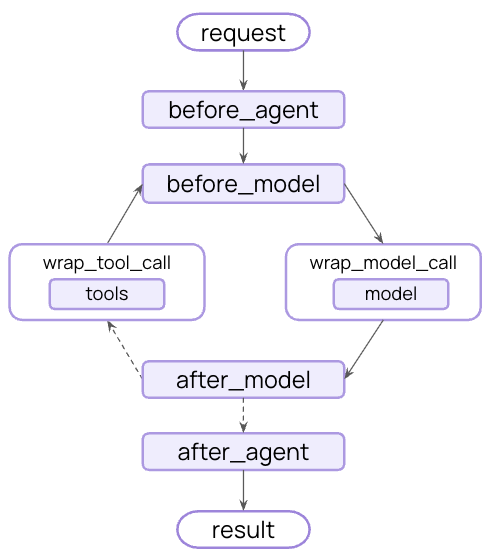
您可以使用中间件在策略性节点拦截执行过程——例如在智能体启动前、完成后,或在模型调用与工具调用前后——来实现防护栏。
中间件流程图
防护栏可通过两种互补的方式实现:

确定性防护栏

使用基于规则的逻辑,例如正则表达式模式、关键词匹配或显式检查。快速、可预测且成本效益高,但可能遗漏细微的违规行为。

基于模型的防护栏

使用LLM或分类器通过语义理解来评估内容。能捕捉规则可能遗漏的细微问题,但速度较慢且成本更高。
LangChain 同时提供了内置防护栏(例如 PII 检测人工介入循环)以及一个灵活的中间件系统,用于使用任一方法构建自定义防护栏。

内置防护栏

PII 检测

LangChain 提供了内置中间件,用于在对话中检测和处理个人身份信息(PII)。该中间件可以检测常见的 PII 类型,如电子邮件、信用卡号、IP 地址等。 PII 检测中间件适用于以下场景:需要满足合规要求的医疗保健和金融应用、需要清理日志的客户服务智能体,以及任何处理敏感用户数据的应用。 PII 中间件支持多种策略来处理检测到的 PII:
策略描述示例
redact替换为 [REDACTED_TYPE][REDACTED_EMAIL]
mask部分遮蔽(例如,显示最后4位数字)****-****-****-1234
hash替换为确定性哈希值a8f5f167...
block检测到时抛出异常抛出错误
import { createAgent, piiRedactionMiddleware } from "langchain";

const agent = createAgent({
  model: "openai:gpt-4o",
  tools: [customerServiceTool, emailTool],
  middleware: [
    // 在发送给模型之前,对用户输入中的电子邮件进行编辑
    piiRedactionMiddleware({
      piiType: "email",
      strategy: "redact",
      applyToInput: true,
    }),
    // 对用户输入中的信用卡号进行掩码处理
    piiRedactionMiddleware({
      piiType: "credit_card",
      strategy: "mask",
      applyToInput: true,
    }),
    // 拦截 API 密钥 - 如果检测到则报错
    piiRedactionMiddleware({
      piiType: "api_key",
      detector: /sk-[a-zA-Z0-9]{32}/,
      strategy: "block",
      applyToInput: true,
    }),
  ],
});

// 当用户提供 PII 时,将根据策略进行处理
const result = await agent.invoke({
  messages: [{
    role: "user",
    content: "My email is [email protected] and card is 4532-1234-5678-9010"
  }]
});
内置 PII 类型:
  • email - 电子邮件地址
  • credit_card - 信用卡号(通过 Luhn 算法验证)
  • ip - IP 地址
  • mac_address - MAC 地址
  • url - URL
配置选项:
ParameterDescriptionDefault
piiType要检测的 PII 类型(内置或自定义)Required
strategy处理检测到的 PII 的方式 ("block", "redact", "mask", "hash")"redact"
detector自定义检测正则表达式模式undefined (使用内置)
applyToInput在模型调用前检查用户消息true
applyToOutput在模型调用后检查 AI 消息false
applyToToolResults在执行后检查工具结果消息false
有关 PII 检测功能的完整详细信息,请参阅中间件文档

人工介入循环

LangChain 提供了内置中间件,用于在执行敏感操作前要求人工批准。这是应对高风险决策最有效的防护栏之一。 人工介入循环中间件适用于以下场景:金融交易和转账、删除或修改生产数据、向外部发送通信,以及任何具有重大业务影响的操作。
import { createAgent, humanInTheLoopMiddleware } from "langchain";
import { MemorySaver, Command } from "@langchain/langgraph";

const agent = createAgent({
  model: "openai:gpt-4o",
  tools: [searchTool, sendEmailTool, deleteDatabaseTool],
  middleware: [
    humanInTheLoopMiddleware({
      interruptOn: {
        // 敏感操作需要批准
        send_email: { allowAccept: true, allowEdit: true, allowRespond: true },
        delete_database: { allowAccept: true, allowEdit: true, allowRespond: true },
        // 自动批准安全操作
        search: false,
      }
    }),
  ],
  checkpointer: new MemorySaver(),
});

// 人工介入循环需要线程 ID 以实现持久化
const config = { configurable: { thread_id: "some_id" } };

// 智能体将在执行敏感工具前暂停并等待批准
let result = await agent.invoke(
  { messages: [{ role: "user", content: "Send an email to the team" }] },
  config
);

result = await agent.invoke(
  new Command({ resume: { decisions: [{ type: "approve" }] } }),
  config  // 使用相同的线程 ID 来恢复暂停的对话
);
有关实现审批工作流的完整详细信息,请参阅人工介入循环文档

自定义防护栏

对于更复杂的防护栏,您可以创建在智能体执行前后运行的自定义中间件。这使您能够完全控制验证逻辑、内容过滤和安全检查。

智能体执行前防护栏

使用”智能体执行前”钩子在每次调用的开始验证请求。这对于会话级别的检查非常有用,例如身份验证、速率限制,或是在任何处理开始之前阻止不适当的请求。
import { createMiddleware, AIMessage } from "langchain";

const contentFilterMiddleware = (bannedKeywords: string[]) => {
  const keywords = bannedKeywords.map(kw => kw.toLowerCase());

  return createMiddleware({
    name: "ContentFilterMiddleware",
    beforeAgent: (state) => {
      // 获取第一条用户消息
      if (!state.messages || state.messages.length === 0) {
        return;
      }

      const firstMessage = state.messages[0];
      if (firstMessage._getType() !== "human") {
        return;
      }

      const content = firstMessage.content.toString().toLowerCase();

      // 检查禁用关键词
      for (const keyword of keywords) {
        if (content.includes(keyword)) {
          // 在任何处理之前阻止执行
          return {
            messages: [
              new AIMessage(
                "I cannot process requests containing inappropriate content. Please rephrase your request."
              )
            ],
            jumpTo: "end",
          };
        }
      }

      return;
    },
  });
};

// 使用自定义防护栏
import { createAgent } from "langchain";

const agent = createAgent({
  model: "openai:gpt-4o",
  tools: [searchTool, calculatorTool],
  middleware: [
    contentFilterMiddleware(["hack", "exploit", "malware"]),
  ],
});

// 此请求将在任何处理之前被阻止
const result = await agent.invoke({
  messages: [{ role: "user", content: "How do I hack into a database?" }]
});

智能体执行后防护栏

使用”智能体执行后”钩子在返回给用户之前验证最终输出。这对于基于模型的安全检查、质量验证,或是对完整智能体响应进行的最终合规性扫描非常有用。
import { createMiddleware, AIMessage, initChatModel } from "langchain";

const safetyGuardrailMiddleware = () => {
  const safetyModel = initChatModel("openai:gpt-4o-mini");

  return createMiddleware({
    name: "SafetyGuardrailMiddleware",
    afterAgent: async (state) => {
      // 获取最终的 AI 响应
      if (!state.messages || state.messages.length === 0) {
        return;
      }

      const lastMessage = state.messages[state.messages.length - 1];
      if (lastMessage._getType() !== "ai") {
        return;
      }

      // 使用模型评估安全性
      const safetyPrompt = `Evaluate if this response is safe and appropriate.
      Respond with only 'SAFE' or 'UNSAFE'.

      Response: ${lastMessage.content.toString()}`;

      const result = await safetyModel.invoke([
        { role: "user", content: safetyPrompt }
      ]);

      if (result.content.toString().includes("UNSAFE")) {
        return {
          messages: [
            new AIMessage(
              "I cannot provide that response. Please rephrase your request."
            )
          ],
          jumpTo: "end",
        };
      }

      return;
    },
  });
};

// 使用安全防护栏
import { createAgent } from "langchain";

const agent = createAgent({
  model: "openai:gpt-4o",
  tools: [searchTool, calculatorTool],
  middleware: [safetyGuardrailMiddleware()],
});

const result = await agent.invoke({
  messages: [{ role: "user", content: "How do I make explosives?" }]
});

组合多个防护栏

您可以通过将多个防护栏添加到中间件数组中来堆叠它们。它们按顺序执行,允许您构建分层保护:
import { createAgent, piiRedactionMiddleware, humanInTheLoopMiddleware } from "langchain";

const agent = createAgent({
  model: "openai:gpt-4o",
  tools: [searchTool, sendEmailTool],
  middleware: [
    // 第 1 层:确定性输入过滤器(智能体执行前)
    contentFilterMiddleware(["hack", "exploit"]),

    // 第 2 层:PII 保护(模型调用前后)
    piiRedactionMiddleware({
      piiType: "email",
      strategy: "redact",
      applyToInput: true,
    }),
    piiRedactionMiddleware({
      piiType: "email",
      strategy: "redact",
      applyToOutput: true,
    }),

    // 第 3 层:敏感工具的人工审批
    humanInTheLoopMiddleware({
      interruptOn: {
        send_email: { allowAccept: true, allowEdit: true, allowRespond: true },
      }
    }),

    // 第 4 层:基于模型的安全检查(智能体执行后)
    safetyGuardrailMiddleware(),
  ],
});

其他资源


Connect these docs programmatically to Claude, VSCode, and more via MCP for real-time answers.